
 Ksarthur
Hi all,
I added the mod with thunderstore. When I play and try to place a blueprint building, I see the "ghost" building, I can move it, adjust everything, but I can't place it, nothing work. I tried to click many time but it doesn't work (left click, ctrl + left click ect ect....). Anyone can help me ? I hope I'm clear with my explanation.
I already tried to change some configurations, but nothing solves the problem...
I saw someone talking about PublicTest build, i dont know exactly whats that, but i think it's disabled.
Thank you all !!!
I added the mod with thunderstore. When I play and try to place a blueprint building, I see the "ghost" building, I can move it, adjust everything, but I can't place it, nothing work. I tried to click many time but it doesn't work (left click, ctrl + left click ect ect....). Anyone can help me ? I hope I'm clear with my explanation.
I already tried to change some configurations, but nothing solves the problem...
I saw someone talking about PublicTest build, i dont know exactly whats that, but i think it's disabled.
Thank you all !!!
5

PlanBuild has been updated to fix this issue!
It stopped working after the call to arms update, it still seems to work for smaller blueprints but not larger ones, I did reach out to Marco on Discord, but so far no response .
But all is not lost, you can still create, save and place blueprints with the Infinity Hammer mod using the console commands 'Hammer_save filename' to save and place the blueprint using the command 'hammer_blueprint filename" after you create the blueprint by equiping the hammer and using the 3rd hammer from the left under the misc tab ,you cannot add snap points or terrain markers yet but I am told by the dev that they are coming soon. you can also do many other things that planbuild cannot as long as you don't mind using the console ;)
Hope this helps ....
But all is not lost, you can still create, save and place blueprints with the Infinity Hammer mod using the console commands 'Hammer_save filename' to save and place the blueprint using the command 'hammer_blueprint filename" after you create the blueprint by equiping the hammer and using the 3rd hammer from the left under the misc tab ,you cannot add snap points or terrain markers yet but I am told by the dev that they are coming soon. you can also do many other things that planbuild cannot as long as you don't mind using the console ;)
Hope this helps ....
THANK YOU SO MUCH. YOU SAVED MY SANITY. but also crashed my game...
I think the new Call to Arms Patch broke it. Hopefully a patch will be coming soon

For me it was a conflict with ValheimPerformanceOverhaul mod
ValheimPerformanceOverhaul is caching the answer. Both mods put a Harmony prefix on the same method, WearNTear.GetSupport:
- PlanBuild.dll → WearNTear_GetSupport_Prefix (needs a live support number to decide if a plan is finishable)
- ValheimPerformanceOverhaul.dll → GetSupport_Prefix ([10. Piece Optimization], caches structural integrity for 5s)
And critically:
Support Cache Duration (seconds) = 5
Smart Cache Invalidation = false ← cache is never invalidated on change
So the plan piece got a "0 support" answer once, and the cache keeps serving it. Wood is irrelevant — "not enough support" is a geometry check, not a materials check.
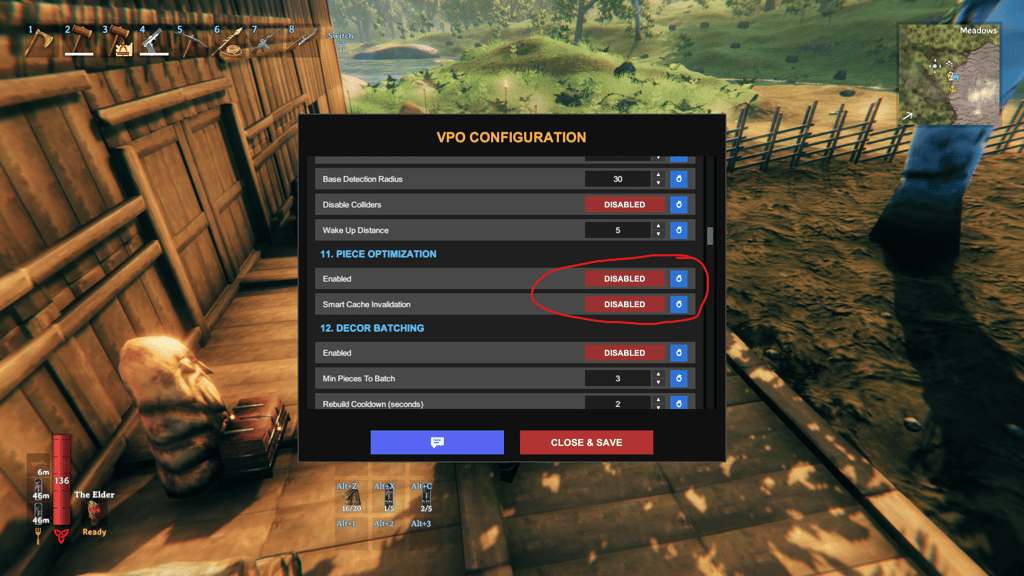
ValheimPerformanceOverhaul is caching the answer. Both mods put a Harmony prefix on the same method, WearNTear.GetSupport:
- PlanBuild.dll → WearNTear_GetSupport_Prefix (needs a live support number to decide if a plan is finishable)
- ValheimPerformanceOverhaul.dll → GetSupport_Prefix ([10. Piece Optimization], caches structural integrity for 5s)
And critically:
Support Cache Duration (seconds) = 5
Smart Cache Invalidation = false ← cache is never invalidated on change
So the plan piece got a "0 support" answer once, and the cache keeps serving it. Wood is irrelevant — "not enough support" is a geometry check, not a materials check.
